|
|
|
|
|
Designing Courses Students Can Navigate
Students should not have to hunt through menus to find what they need.
Strong digital course architecture clearly organizes weekly tasks, resources, guidelines, and tools around your learning objectives, helping students spend less time troubleshooting and more time learning.
This month, we’re looking at how intentional digital design can create a smoother, more effective semester. For a deeper dive, read our latest blog post: How Technology-Supported Teaching Strengthens Lab and Lecture Course Rigor.
New Feature Spotlight: Streamlined Dashboard Upgrades
We’re always listening to your feedback and working hard to improve our platform to fit your teaching needs. Just this year, our team has added 73 enhancements and 203 accessibility improvements. Here’s a note on our latest additions.
New Homepage Panels Help Students Stay on Track
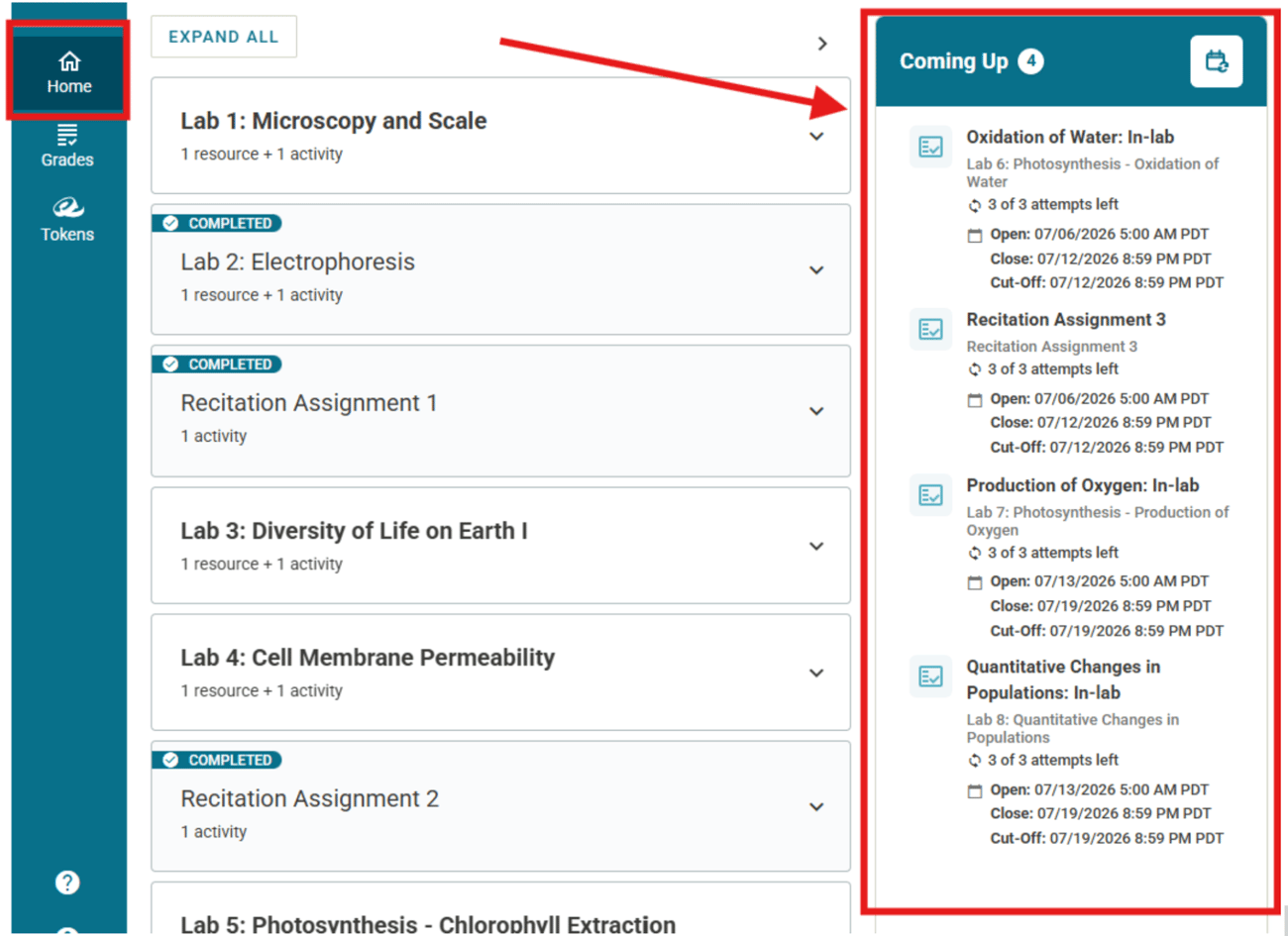
Labflow and Spark now feature collapsible homepage panels that show students what’s coming up, including activity deadlines, open and close dates, attempt tracking, and prerequisite steps. Students can click directly into available activities, see locked items when prerequisites are required, and get instant confirmation with a green checkmark once tasks are complete.
|
|
|
 |
|
→ Things We’re Hearing: One instructor has already given the feedback that this feature “is better than deep linking in Canvas!”
New Grading Panel Helps Teams Move Faster
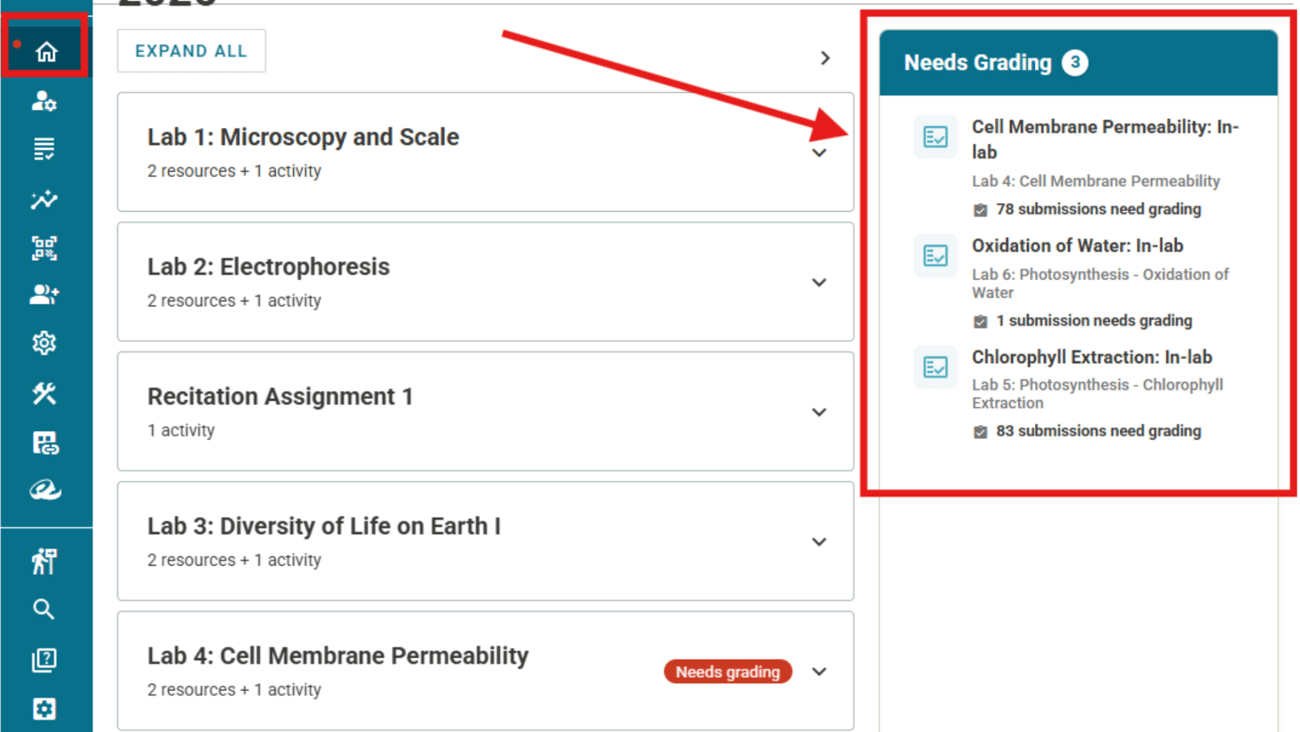
Instructors and TAs now have a dedicated Needs Grading panel showing assignments that require attention. Clicking any item takes your grading team directly to that report’s Quick Grade tab, so no one has to hunt for outstanding submissions. |
 |
|
Labflow & Spark: Tips & Tricks
Before the new term begins, try these architecture-focused tips from our Faculty Success Managers, Abby and Kara:
1. Use Data Insight as a grading check: Review grading progress across sections before releasing grades to catch outliers and support consistency.
2. Anchor prep meetings in the Definition Tab: Keep TAs and instructors aligned on the concepts being assessed each week.
3. Use Tokens to encourage pacing: Build simple guardrails that help students track deadlines, manage submissions, and stay accountable.
Want to put these practices into action for your course? Reach out to your Faculty Success Manager for help getting started!
|
|
Instructor Spotlight |
|
|
|
Mastering Asynchronous Navigation
Kate Graham, PhD and the UNE Chemistry Team, University of New England |
|
|
|
This month, we’re spotlighting Kate Graham, PhD and the UNE Chemistry Team at the University of New England for their masterclass in asynchronous digital architecture.
By strategically using Access Restrictions in Labflow and Spark, the UNE team guides students through coursework step-by-step, helping them master foundational concepts before moving ahead and bringing traditional classroom pacing into a self-paced format.
Their approach highlights an important principle: while Labflow and Spark can support in-person, hybrid, or fully asynchronous learning, each modality needs intentional design from the start to ensure student success.
Join the Conversation
Are you doing something unique with your course architecture or utilizing our new homepage panels in a creative way? Reply directly to this email or drop a comment in our Faculty Community Forum.
|
|
Warmly,
The Catalyst Team
Built by Educators. Powered by Innovation. |
|
|
|
|
|
|
|
|
|